ForgeGUI Roblox: A 2026 Full Review
A long-form ForgeGUI review built from one real brief: four asset types, the prompts that worked, what the credits actually cost, and the limits worth knowing before you subscribe.
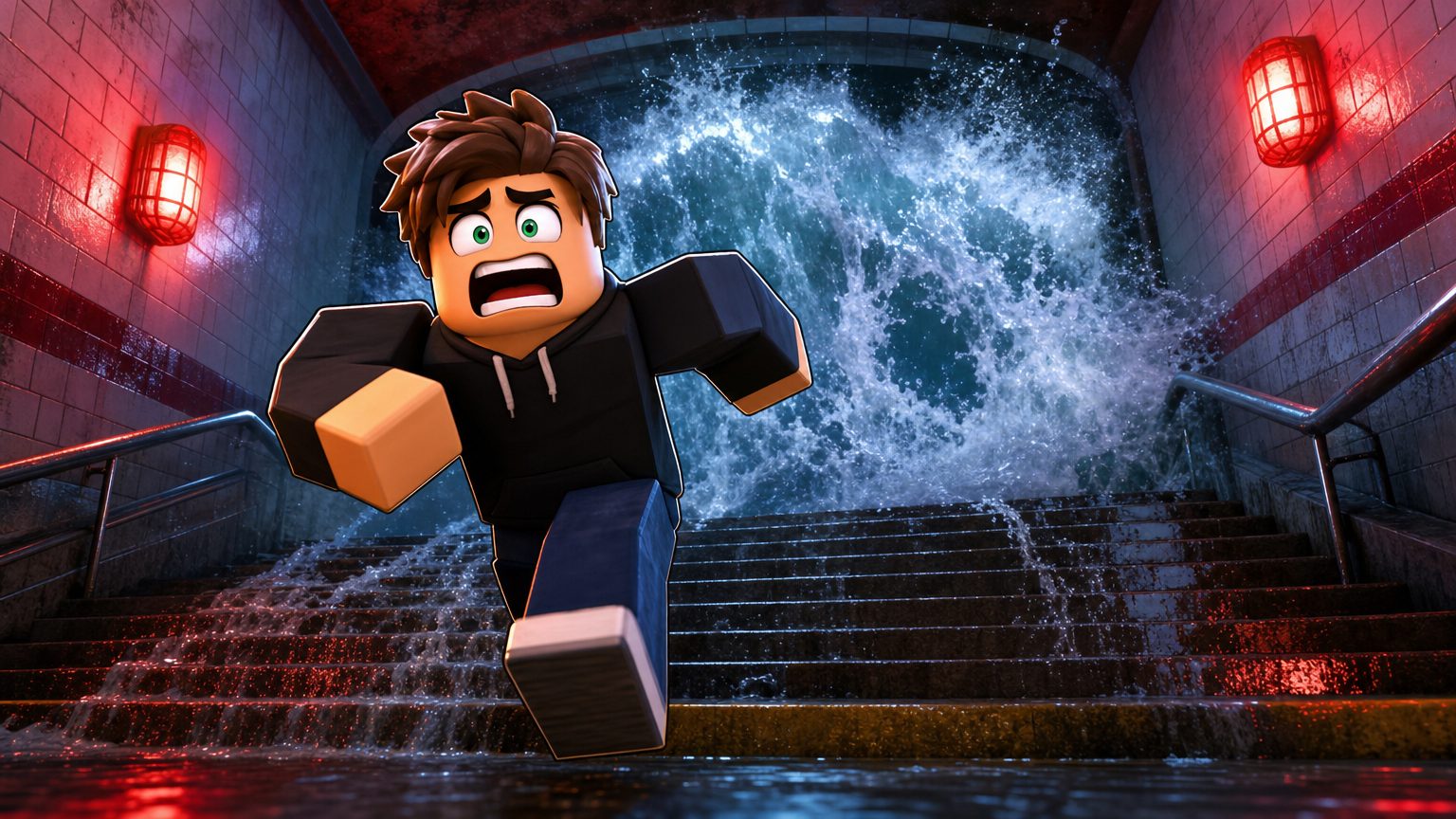
Reviews of generation tools usually end up as a list of adjectives. This one is built around a single question I can answer with evidence: give the tool one real game brief, and how much of the visual work is actually done when it stops?
So I picked a brief, ran all four asset types against it, kept what came back, and wrote down where each result still needed a human. Everything below refers to output I generated, not to marketing copy.
How this was checked: everything here comes from what ForgeGUI published about itself on September 2, 2026, together with generation runs against the brief below in the sibling GFX Forge workspace, which carries identical asset types, presets and credit costs. The one place the two products diverge — the model selector — is called out where it matters. Promotional prices move constantly, which is why the date is attached.
The brief
Flooded Metro. A survival-escape game where players climb out of a subway system as water rises. Needs a store thumbnail, a shop interface, a survivor character, and a market-stall prop for the surface level.
That is deliberately ordinary. It is the kind of brief that turns into four separate freelance conversations, and it is exactly the workload these tools claim to compress.
What ForgeGUI is
A browser workspace with four generators behind one control bar: thumbnail, GUI, avatar, and 3D. The bar also carries a platform look (Roblox, Minecraft, Unity, Fortnite), one of five style presets — Auto, Horror, Cartoony, Anime, or Survival — and, uniquely among its siblings, a menu of ten image engines. On the review date those were GPT Image 2, Seedream V5 Pro, Nano Banana Pro, Nano Banana 2, Qwen Image 3.0, Qwen Image 3.0 Pro, Grok Imagine V2, Krea V2 Turbo, Nano Banana 2 Lite, and Krea V2 Large.
What it is not: a game engine, a level editor, or an export pipeline. Nothing it produces enters your experience without you putting it there.
Round 1: the thumbnail
Prompt: a lone blocky player sprinting up a flooded subway staircase as a wall of water surges behind, emergency lights flashing red on wet tiles. Style preset: Survival. Platform: Roblox.
That result is the image heading this review. It came back usable on the first attempt, which is not the norm and is worth being honest about — I have had briefs take four tries. What made this one work was that the prompt contained a subject, an action, a threat, and a light source. Vague thumbnail prompts fail because they describe a mood instead of a frame.
Two things I would still fix by hand: the character sits slightly left of where I would crop for a square store icon, and I would test the frame at 256 pixels before publishing it. The generator has no opinion about how your thumbnail performs; it just gets you a candidate fast enough that testing four of them is realistic.
Verdict for this round: the strongest of the four generators, and the one that most clearly replaces paid work.
Round 2: the interface
Prompt: a survival supply shop panel for a flooded subway game, four supply cards — water flask, rope, flashlight, medkit — with prices, a salvage currency counter, and one large purchase button. Style preset: Survival.
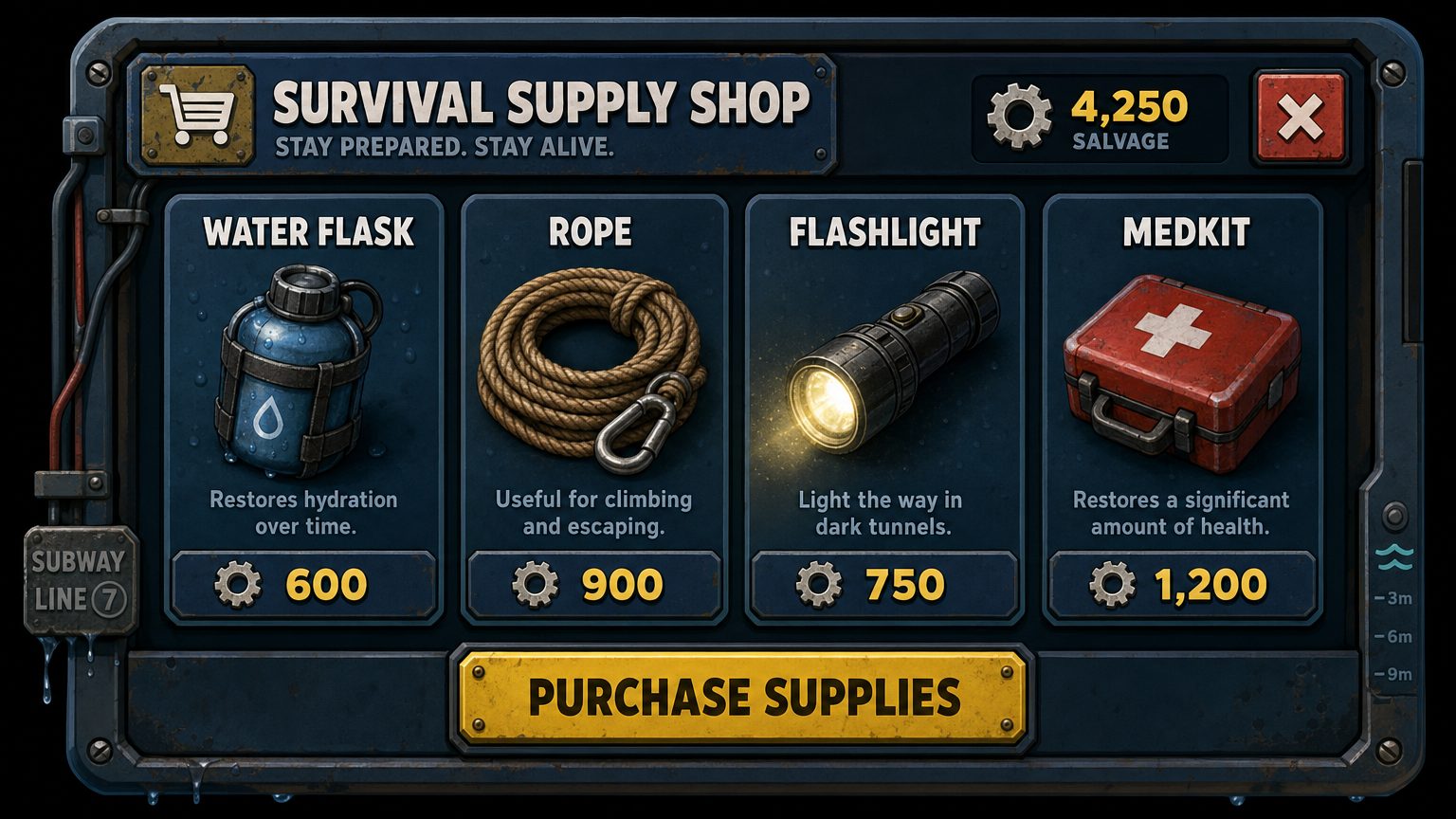
The hierarchy came back right: four evenly weighted item cards, a currency counter in the top corner, a close control, and one unmistakable primary action across the bottom. As a specification for a developer, this settles the layout argument in a single image.
What it also did was invent copy. Every card arrived with its own description line, the currency is called salvage, and there is a subway-line badge and a water-depth scale down the right edge that I never asked for. Some of that is a gift — the depth scale is a better idea than anything in my prompt. All of it is placeholder text that has to be rewritten in Studio, because generated lettering inside an image is decoration, not a string table.
As an interface, it does not exist. Nothing in that image is Luau, and the ScreenGui, the anchor points, the phone scaling and the gamepad focus order are all still unwritten. Anyone expecting a build artifact will feel misled — not because the product overpromises, but because "GUI generator" reads like "UI builder" if you are skimming.
Verdict for this round: excellent as a spec, useless as an export. Know which one you needed before you buy.
Round 3: the character
Prompt: a desert scavenger in a sand-worn cloak with a scrap-metal arm, cracked goggles pushed up on the forehead, water flask and tool straps across the chest, full body front view.
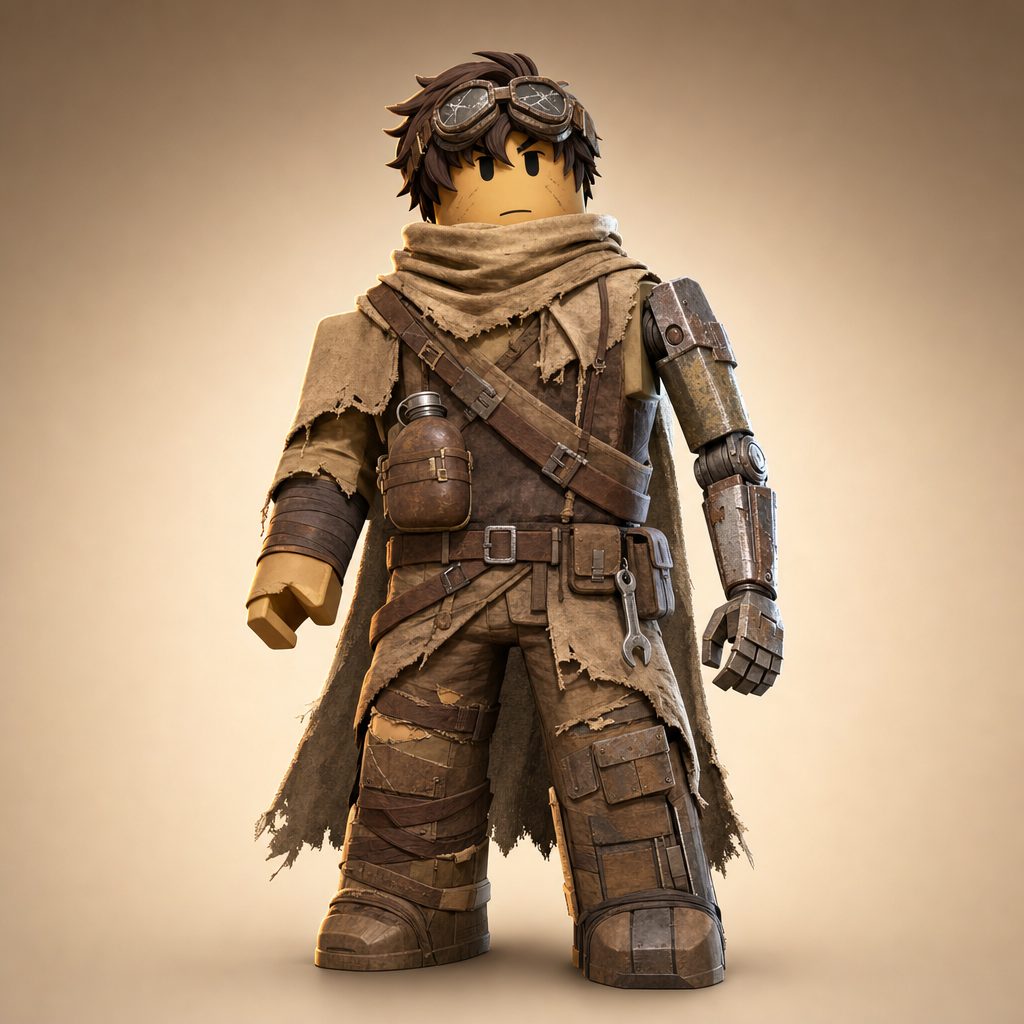
Every element I asked for is present and legible, which is the whole point of running this before commissioning anything: two people can now argue about a specific coat rather than about the word "scavenger".
The limits are structural. This is a picture of a character rather than a Roblox avatar: nothing about it is wearable, because there is no rig behind it and no bundle or catalog item to equip. It tells you what to assemble; assembling it is still your afternoon.
Verdict for this round: a decision tool, and a good one, as long as nobody on your team thinks a rig is arriving.
Round 4: the 3D prop
The 3D path behaves differently from the other three. It runs as a background task, it costs 120 credits instead of 10, and it returns two things — a reference render, and geometry reconstructed from that render.
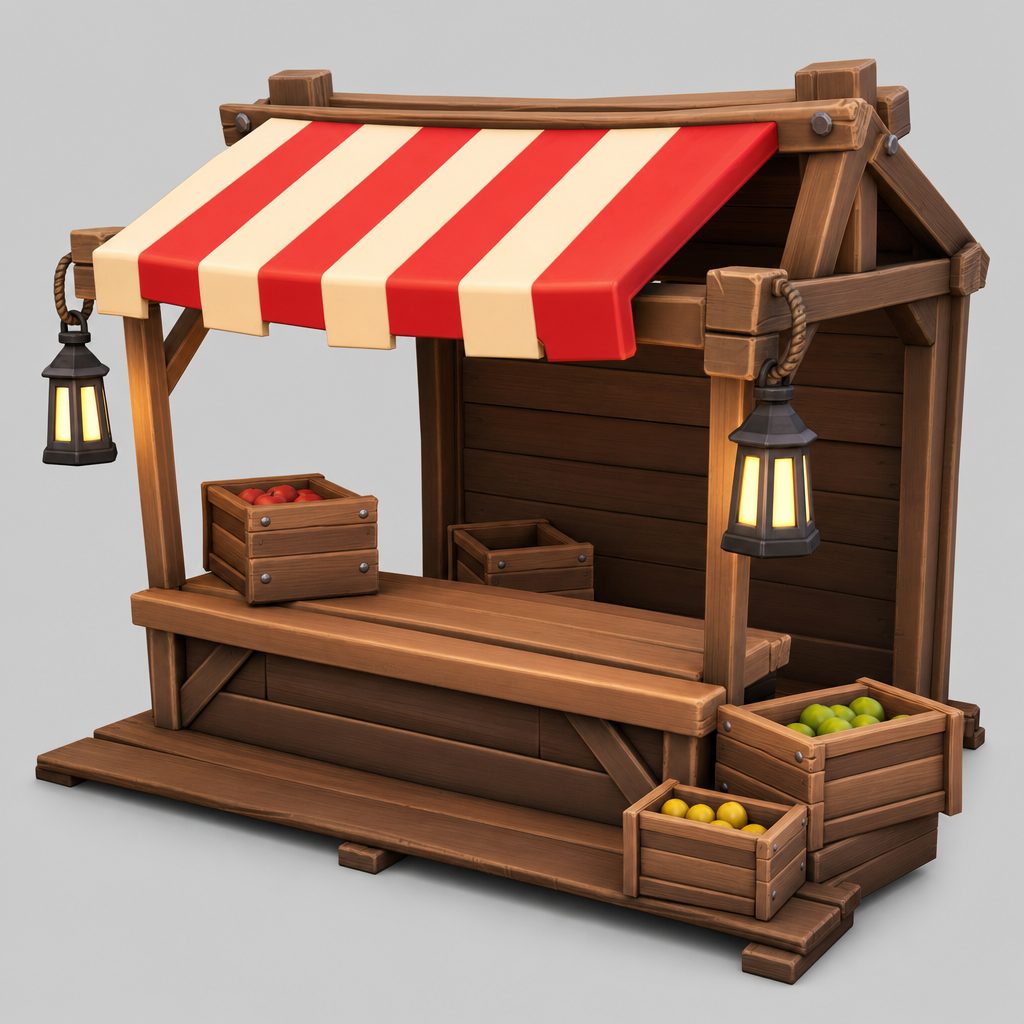
The useful mental model: it settles whether a shape deserves to exist, and says nothing about whether an asset is ready to ship. What you can do with the result: rotate it, judge the proportions, and hand a modeller a volume you have already agreed on instead of a paragraph of description. What you cannot do: drop it into a live experience and move on. Topology, optimisation, rigging, and the Studio import remain yours.
Two details that make the price defensible: a failed task refunds its credits automatically, and tasks continue server-side so closing the tab does not cost you the run.
Verdict for this round: honest about what it is. Compare it against a production 3D tool such as Nilo only if your job is finishing assets, not sketching them.
Three prompt changes that mattered
Across the four rounds, the same three edits did more than any setting:
- Name the light. "Emergency lights flashing red on wet tiles" produced a coherent scene; the same prompt without a light source produced a flat one.
- Say what the panel contains, not what it is for. "Three weapon cards with damage and price" beats "a nice shop UI" by a distance.
- Give a character one contradiction. "Sand-worn cloak" plus "scrap-metal arm" creates a silhouette. Three adjectives of the same kind create mush.
None of these are model tricks. They are the same instructions you would give a human illustrator, which is the useful way to think about the whole product.
Why not just use a general image tool?
Because the platform preset is doing real work. Asking a general model for "a Roblox-style character" gets you an imitation assembled from whatever it saw. Selecting Roblox here sets proportions, surface language, and staging conventions before your words are added.
The second reason is workflow rather than pixels: asset type, platform, style, reference images, and edit history live in one place, so a series of assets for one game stays consistent without you re-explaining the game every time.
What a real month costs
Every image is 10 credits. Annual billing is $9.90, $19.90, and $49.90 a month (billed $118.80, $238.80, and $598.80 for the year) for 1,000, 4,000, and 10,000 credits a month. Monthly billing is $14.90, $39.90, and $99.90. One-time credit packs are also sold at $29.90, $49.90, and $99.90 for 2,000, 3,500, and 6,800 credits, and those credits do not expire.
This whole review — four asset types, plus the retries I did not publish — cost well under 500 credits including the 120-credit 3D task. On the middle tier that is roughly an eighth of a month's allowance for a complete visual pass on one game update. The expensive tier buys volume, not better output.
If you are unsure, a free account with its daily rewards covers enough image runs to settle the question yourself — a better test than any review, this one included.
Where GFX Forge fits
GFX Forge is a sibling of ForgeGUI and I am not going to pretend otherwise: same four asset types, same platform presets, same five styles, same 10-credit image, same 120-credit 3D task, same prices. Everything in this review's four rounds behaves the same way in either workspace.
The one real difference is the model selector, which ForgeGUI has and GFX Forge does not. That is a preference, not a ranking. If you want to run one brief through two engines and keep the better frame, ForgeGUI gives you the switch. If you would rather have one tuned path and a control bar that only asks about your game, GFX Forge is the same product with one less decision in it.
Limits worth knowing before you pay
- It does not export interfaces as code. The most common disappointment.
- It does not rig or animate characters.
- Its 3D output is a draft. Useful, inspectable, not shippable.
- It cannot promise clicks. It lowers the cost of testing directions.
- It does not clear Roblox moderation for you. Everything you upload still has to pass the platform's own rules.
- Generated text inside images is unreliable, as it is everywhere. Set real labels in Studio, not in the picture.
FAQ
Is ForgeGUI worth it for a solo creator?
If you ship updates and currently pay per thumbnail, yes — the middle tier covers a normal month several times over. If you make one game image a year, use the free credits and skip the subscription.
How is this different from ChatGPT or Midjourney?
Platform presets, asset-type templates, reference and edit continuity, and a credit model built around iterating on game assets. A general tool can make a pretty picture; it does not keep a Roblox thumbnail series consistent for you.
Does the 3D generator export to Roblox Studio automatically?
No. It returns downloadable geometry. You run the import yourself, and nothing is written into your experience on your behalf.
Can I use the output commercially?
The paid tiers advertise watermark-free output inside a private workflow intended for commercial use. What Roblox itself requires of you does not change.
Is ForgeGUI affiliated with Roblox?
No. It is an independent tool that produces assets for Roblox creators.
Final thoughts
ForgeGUI does what it says: it turns a written idea into a usable game visual fast enough that testing several directions becomes normal instead of expensive. Its thumbnail generator is genuinely strong, its GUI generator is a good spec tool that people keep mistaking for a build tool, its avatar generator settles arguments, and its 3D path is an honest draft with a fair refund policy.
The failure mode is not the product. It is buying it to get an artifact it never advertised. Work out which of the four handoffs you actually need, and it earns its place quickly.
Want to run this brief yourself? Open the generator with a free account, or read the 3D pipeline page first if the 120-credit task is the part you are weighing.